Multiple SPF records? Fix the policy safely.
Two SPF records at one name do not merge. Inventory authorized senders, combine only verified instructions, and review nested DNS lookups before changing policy.
 A field note on email
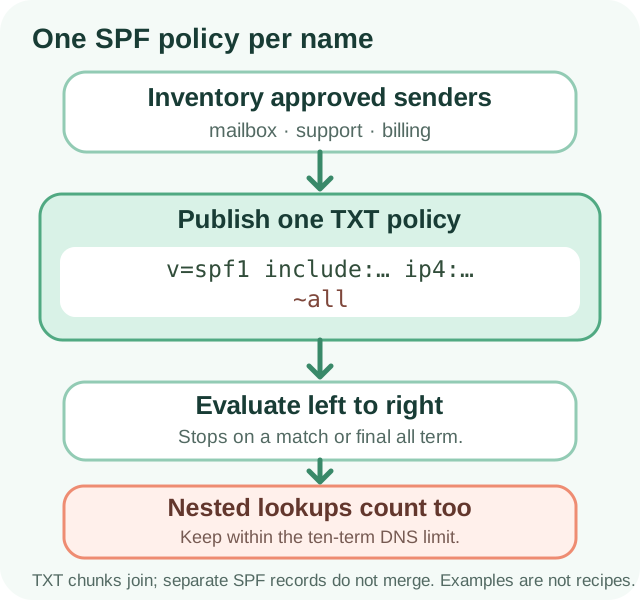
- Publish one TXT record beginning `v=spf1` at each name that sends mail; separate SPF records at the same name are not combined.
- Quoted character-strings within one TXT record are concatenated without a space; they are not separate policies.
- Inventory authorized senders and preserve provider-approved mechanisms and their evaluation order before consolidating.
- SPF has a ten DNS-lookup-term limit across nested evaluation. Bare’s standalone syntax check does not fully recurse through provider includes.
More than one selected SPF record produces a permanent error. DNS TXT chunks inside a single record are concatenated without adding spaces.
Source 1 ↗What a “multiple SPF” warning means
An SPF policy is a DNS TXT record that begins with v=spf1. For a particular queried domain name, SPF expects one selected policy. If two separate TXT records at that name both begin with v=spf1, a receiver does not merge their sender lists; the SPF check returns a permanent error. That can make SPF fail to provide a useful authorization result for messages using that identity.
First confirm the warning is about separate DNS records at the same exact name. A root domain and a subdomain are different names and can each have their own SPF policy. Also distinguish SPF from other TXT records: verification tokens, DKIM keys, and DMARC policy are different data and should not be deleted just because they are TXT records.
- Query the exact envelope/MAIL FROM domain used by the sending service.
- Count separate TXT answers that begin with
v=spf1at that name. - Keep unrelated verification, DKIM, and DMARC TXT records intact.
DNS text chunks are not multiple records
DNS permits one TXT record to contain multiple quoted character-strings. Resolvers concatenate the strings in that same record exactly, without inserting a space. This can help a DNS interface represent a long value, but it does not create extra room for an additional SPF policy. By contrast, two separate TXT records at the same name remain two records even if the control panel displays them together.
The two chunks below form one syntactically complete example policy. The space at the end of the first string matters. The address is reserved for documentation; this example is not a policy to publish on your domain:
example.test. TXT "v=spf1 ip4:192.0.2.10 " "-all"

Concatenated: v=spf1 ip4:192.0.2.10 -allInventory senders before consolidating
Do not blindly copy each visible SPF value into a longer policy. Make a list of systems authorized to send for the relevant domain: employee mail, newsletters, billing notifications, support platforms, website forms, and any gateways or on-premises servers. Ask the person responsible for each service for its current SPF instructions and confirm which domain appears in its SMTP MAIL FROM identity. SPF does not directly authorize the human-readable From header.
A policy evaluates terms in order and stops when a mechanism matches; an all term is terminal. If you put a broad all before later mechanisms, those later terms are never reached. Keep only senders that are still approved, preserve provider-required include or address mechanisms, and coordinate removals with the system owner. A sample policy is not a safe recipe for a different domain.
example.test TXT "v=spf1 include:spf.sender.example ip4:192.0.2.10 ~all"

The example domain and documentation address are not a live configuration.Review nested lookups and avoid risky shortcuts
SPF allows at most ten DNS-querying terms during one evaluation. Count terms reached inside nested include policies as well as those in the visible record. include, a, mx, ptr, and exists mechanisms and the redirect modifier can cause lookups; mechanisms such as ip4, ip6, and all do not count toward this limit. Exceeding the limit can produce permerror. Provider policies can change, so a previously acceptable include tree may need review later.
Bare.io’s standalone SPF syntax check reviews the text you enter; it does not fully recurse through provider includes or calculate the complete nested lookup budget. A result there is not proof that a real message passes SPF. Avoid flattening includes into copied IP addresses or changing ~all to -all as a blanket fix: doing so can leave out legitimate senders or reject their mail. Ask providers and administrators to confirm the policy, then test real messages and inspect receiver-added authentication results.
- After editing, query DNS and confirm exactly one SPF record at the intended name.
- Review nested lookup terms with each sending provider; do not rely only on a visible-term count.
- Test messages from every authorized system and check SPF results on received headers.
- Assess DKIM and DMARC separately; a valid SPF declaration alone does not prove delivery or alignment.
Your next-step checklist
- Find the exact queried domain and count separate TXT records beginning `v=spf1`.
- Inventory each legitimate sender and get its current instructions from the provider or owner.
- Combine only confirmed mechanisms in the existing policy, preserving evaluation order and its intended `all` behavior.
- Review nested DNS-lookup terms across includes and redirects; a syntax-only check is not a recursive evaluation.
- After publishing, verify one SPF record and test real messages from each authorized sender before tightening policy.
Sources & further reading
- 1RFC 7208 — Sender Policy Framework (SPF)
Sections 2.3, 3.2–3.3, 4.5–4.6.4 define the checked identity, single-record selection, TXT string concatenation, evaluation order, and lookup limit.
- 2Set up SPF — Google Workspace Help
Provider guidance recommends identifying all senders and maintaining one SPF TXT record; examples are for the listed services only and should not be copied blindly.
- 3Set up SPF for Microsoft 365 — Microsoft Learn
Provider documentation identifies the SMTP MAIL FROM identity and notes that SPF is one part of a broader SPF/DKIM/DMARC setup.
- 4RFC 5737 — IPv4 Address Blocks Reserved for Documentation
192.0.2.0/24 is reserved for documentation examples; it is not a sender address to publish.