MX records, explained.
MX records point senders toward mail servers. Read their priorities, distinguish no MX from Null MX, and change routing without interrupting delivery.
 A field note on email
- An MX record names a mail exchanger for a domain; senders look up that name’s A or AAAA address to connect.
- Lower MX preference numbers are tried before higher numbers. Equal values can share traffic.
- A Null MX record, `0 .`, explicitly says the domain accepts no mail. An absent MX is different: SMTP may use the domain’s own address records as an implicit MX.
- MX handles incoming routing; SPF, DKIM, and DMARC address separate authentication questions.
MX records affect inbound routing. They do not authorize outbound senders or verify a message.
Source 1 ↗What an MX record does
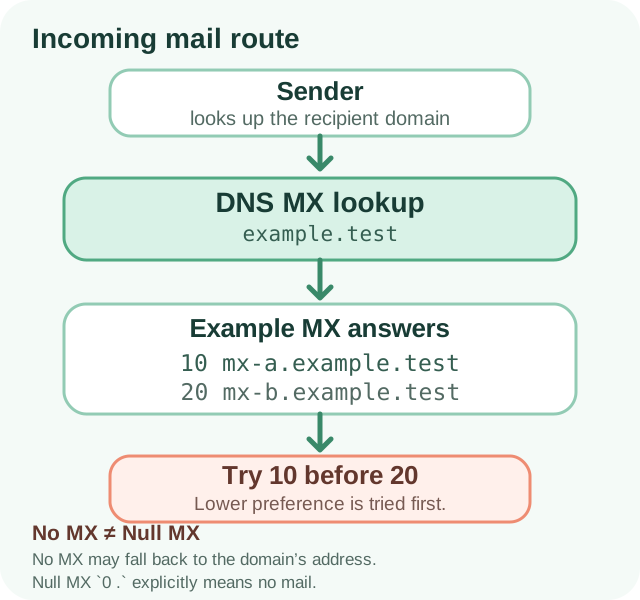
A mail exchanger (MX) record tells sending mail systems where to deliver messages addressed to a domain. For person@example.test, the sender looks up the MX records for example.test. Each usable MX answer names a mail-server hostname; the sender then resolves that hostname to an IP address and connects using SMTP. MX records do not point to a person’s mailbox or decide whether a particular message is accepted.
MX is only one piece of email setup. SPF is a TXT policy about which systems may send using a domain in the SMTP transaction. DKIM lets a sender sign a message and publish a verification key in DNS. DMARC checks whether SPF or DKIM passes with an identity aligned to the visible From domain. Changing MX can move incoming mail while leaving those outbound authentication records unchanged. Website hosting is separate too: mail and web traffic can go to different providers.
Read preference values and mail-server names
MX preference is an ordering value: lower numbers are more preferred. If a sender cannot reach a preferred exchanger, it can try another usable MX with a higher number. Two exchangers with the same preference may be used as alternatives; they are not ranked by which number looks larger. The hostname on the right must resolve to an address so the sending system can connect.
Here is a documentation-only example. It is not a working mail setup, and the .test names should not be published as your provider’s configuration:
example.test.  MX  10  mx-a.example.test.
example.test.  MX  20  mx-b.example.test.

Preference 10 is tried before preference 20.- Ask your mail provider for the exact MX hostnames and preference values.
- Check that each target hostname resolves to A or AAAA records.
- Keep old and new routes coordinated during a provider migration so mail is not sent to a retired service.
No MX record is not the same as Null MX
A Null MX is a specific statement that the domain does not accept email. It is published as one MX record with preference 0 and exchange . — commonly shown as 0 . in a DNS interface. A domain using Null MX must not publish other MX records at the same name. Choose it only when the domain is intentionally not used to receive mail.
If a lookup returns no MX records at all, do not automatically conclude that the domain cannot receive email. Under SMTP’s implicit-MX rule, when no MX records are present, a sender may treat the domain itself as the mail host and try its address records. This is why “MX missing” and “no mail service” are different findings. A Null MX makes the no-mail intent explicit and prevents that fallback interpretation.
A temporary DNS failure is different again. A timeout or server failure means the lookup could not be completed; it is not proof that no record exists. Retry or check the authoritative DNS service before changing configuration.
example.test.  MX  0  .

Null MX: this domain accepts no incoming email.Troubleshoot or migrate MX carefully
First find the authoritative DNS provider and the exact name being edited. For a primary domain this is often @, blank, or the domain itself; subdomains can have their own mail routes. Compare public answers with the receiving provider’s current setup instructions. Do not replace records just because a popular provider’s example looks familiar: service plans and domains can use different values.
Before a migration, make sure the new provider is ready to receive mail and that mailboxes, aliases, and forwarding are in place. Lowering DNS TTL in advance can help resolvers notice a planned change sooner, but it does not make every cached answer disappear immediately. After publishing, check the MX answer and send test messages from outside the domain in both directions. Keep the former service available during the transition when your provider recommends it.
- Confirm the exact domain or subdomain used for incoming mail.
- Copy the provider’s current MX hostname and preference values.
- Check for stale or duplicate MX answers before removing anything.
- Test inbound delivery after DNS has propagated; inspect SPF/DKIM/DMARC separately for outbound authentication.
Your next-step checklist
- Confirm which domain or subdomain should receive mail and where its authoritative DNS is managed.
- Compare all public MX answers with the current instructions from the receiving mail provider.
- Resolve each MX target to an address and check that the receiving service is active.
- Treat Null MX (`0 .`), an empty MX answer, and a failed DNS lookup as different states.
- Send an external test message after a change; review SPF, DKIM, and DMARC separately.
Sources & further reading
- 1RFC 5321 — Simple Mail Transfer Protocol
Section 5.1 covers MX lookup, implicit MX fallback when no MX records are present, resolving exchanger hostnames, and preference ordering.
- 2RFC 7505 — A “Null MX” No Service Resource Record
Defines the single MX with preference 0 and exchange “.” as an explicit statement that a domain accepts no mail.
- 3Set up MX records for Google Workspace — Google Workspace Help
Provider instructions illustrate configuring MX in DNS and activating inbound Gmail service; use the current values for your own account.
- 4Create DNS records for Microsoft 365 — Microsoft Learn
Provider documentation explains MX preference and replacing outdated routes during setup.